
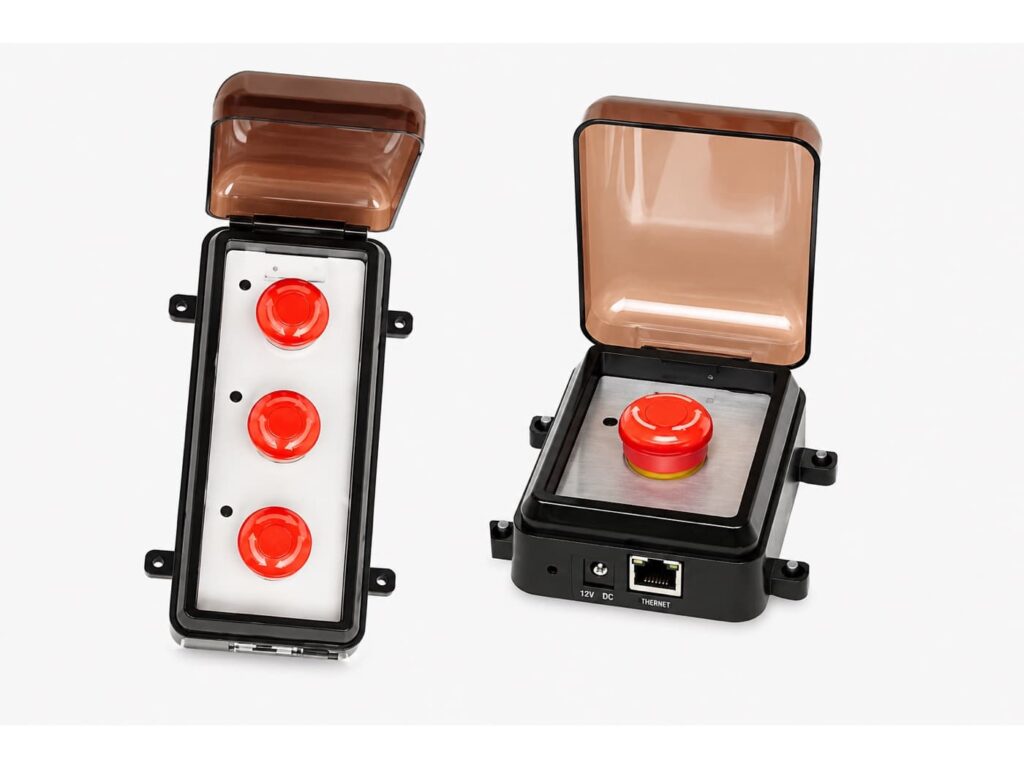
When something goes wrong in a school, a hospital, or a workplace, the person closest to the problem needs one motion to press the button and the building needs to know instantly. Our wireless panic button system is built exactly for that: Smart Network Emergency Switches that send an instant alert over your existing Wi-Fi or Ethernet, trigger lockdown messages on the LED boards, execute pre-recorded audio over the speakers, and put a coordinated emergency response in motion while a phone call would still be ringing. No cellular contract, no monthly monitoring fee, no app to open in a crisis, a simple cost effective layer of workplace safety built on the network you already own.
Innovation Wireless has built synchronized time and communication systems since 2008, on our team’s 30+ years of combined industry experience. A system specialist will map the buttons, the boards, and the audio to your building before you buy, so the day it matters, the response is already designed.
What Our Wireless Panic Button Systems Do
Innovation Wireless panic buttons are Smart Network Emergency Switches in one-button and three-button versions. Each switch connects over Wi-Fi or Ethernet with Power over Ethernet on the wired side and each button is programmed to your emergency plan: display a specific message on the LED message boards, execute a pre-recorded audio alert over the speakers, or both, per event, to communicate the type of emergency the moment it starts. A lift cover prevents accidental activation, power and status LEDs show the switch state at a glance, and the Windows-based software handles control, monitoring, and periodic testing of every device on site. Mount them at the front desk, in classrooms, under the counter, virtually anywhere staff and employees need help fast.
One Press, a Building-Wide Response
A panic button earns its place by what happens after it’s pressed. A siren alone tells everyone something is wrong and nobody what to do; a phone call reaches one person; our system alerts the whole property with the message you wrote in advance. Press the lockdown button and every message board in the building displays the lockdown text while the speakers sound the pre-recorded instruction; the same words, everywhere, immediately. That is the difference between a noise and a plan: in critical situations the press starts the emergency response your team already rehearsed, staff act quickly because the instruction is explicit, and help moves toward the problem while the situation is still seconds old.
One Button or Three: The Smart Network Emergency Switches
We offer two versions of the switch. The one-button version does one job; the single press that matters most in your safety plan, usually lockdown or a general call for immediate help. The three-button version lets one location send three different alerts: each button is programmed to its own event, its own message, its own audio. A school office can have lockdown, severe weather, and all-clear on one switch; a plant can separate medical, evacuation, and security calls. Both versions carry the lift cover against accidental activation, and both show power and status on LEDs so staff can see the switch is ready without touching it, essential when readiness itself is the point.
Wireless Panic Buttons on Wi-Fi or Wired PoE
The system leverages the infrastructure your building already has. On the wireless side, the switches join your Wi-Fi and the alert rides the network the moment the button is pressed. On the wired side, the switch connects with Power over Ethernet technology, one cable carries both power and communication, so there is no wiring project beyond a network drop, no batteries to remember, and the reliability of powered, installed hardware. Either way there is no separate radio license, no cellular path to lease, and no dependence on a phone line: the network you run every day becomes the emergency backbone, with range decided by your own access points and switches, not by a fob’s distance to a hub. Installation is simple, and that ease is exactly what Rick Ford’s testimonial on this page is about.
What the Press Triggers: Boards, Audio, and Lockdown Messages
The switches integrate into the communication platform you build with our indoor message boards and PA speakers. Program a button to push its message to every LED board “LOCKDOWN,” a weather warning, an evacuation notice in text bright enough to read down a hallway. Program the same press to execute a pre-recorded audio message over the speaker system, so the instruction is heard as well as seen, including by people who can’t see a board from where they stand. The customizable alerts provide your organization with complete flexibility: each event sends exactly the response you designed, and the plan adapts as your building changes. The video below demonstrates the switch working with our multi-function message board.
Silent or Loud: Program the Response by Event
Not every emergency should announce itself. Because each button’s response is programmable, you choose per event whether the press is loud, silent, or both. A discreet alert can light the message boards in the office while the public area stays calm, a silent distress signal for a front desk facing a threat. A fire-drill or evacuation press can be as loud as the safety plan requires. Security teams get the information; the situation doesn’t get the escalation. That programmability is what makes one system serve a quiet duress press at a service counter and a full lockdown alert in the same building.
Panic Buttons for Schools and Alyssa’s Law
School panic buttons stopped being optional in much of the country: Alyssa’s Law, adopted in a growing list of states, requires silent panic alarm capability in public schools so staff can summon help without alerting an intruder. Our switches handle the on-campus layer of that response, the silent press in a classroom or front office that puts lockdown messages on boards in every hallway and pre-recorded instructions over the speakers, alongside the school bell system your day already runs, giving campus responders and staff the same information at the same second. Direct notification of law enforcement, emergency services, and first responders is a jurisdiction-by-jurisdiction integration question, and we’ll answer it straight: tell the specialist your state’s requirement and district plan, and we’ll lay out exactly which parts our system covers and how the rest connects.
Duress Buttons for Staff Who Face the Public
The duress button family; staff duress, a duress alarm at a service counter, healthcare panic buttons at the nurse station, hotel panic buttons at the front desk shares one design problem: the person under threat can’t make a scene. A fixed switch mounted under the desk or counter, with a lift cover, pressed without a visible motion, sending a silent alert to security and management: that is the workplace panic button pattern our switches serve in hospitals, hotels, offices, and businesses that protect employees where they meet the public. For hotel housekeeping mandates that require a device carried room to room, ask the specialist, some ordinances call for portable wearables, and we’ll tell you honestly whether a mounted system, a portable one, or both fits your property’s requirement.
Installed Switches vs. Wearables and Apps
 The consumer market is full of a different product: the wearable panic button pendant, the bluetooth fob paired to a phone, the panic button app, the GPS 911 gadget with a monthly plan. Those are personal safety devices, a lifeline for one person, wherever they go, usually tied to a cellular plan or a mobile device that must be charged, carried, and in hand at the exact wrong moment. A building needs the other category: fixed, installed, always-powered switches at the locations where trouble arrives, connected to the building’s own boards and speakers, tested on a schedule from one screen. If your risk is one lone worker in a parking lot, a wearable device has its place and we’ll say so; if your risk is a classroom, a counter, a ward, or a lobby, the wall wins and it’s there when the phone isn’t, and lone workers inside the building are covered by the same switches as everyone else.
Mounted Where Seconds Count
Easy mounting options let the switches go virtually anywhere: under the desk at reception, beside the door in the front office, at the nurse station, on the column by the loading dock. The lift cover keeps a bumped switch from becoming a false alarm, so activation is a deliberate act, so you never activate a response by accident. The LEDs let staff confirm at a glance that each device has power and status, and the Windows-based software gives one person control, monitoring, and periodic testing of every switch on site. By submitting a press-test each location on a schedule, and know the whole system is ready without walking the property. Reset and re-arm are handled from the same screen, so a drill doesn’t cost the afternoon, and the reliability of the system is verified, not assumed.
Where the Button Waits
K-12 schools and universities mount them in offices and classrooms for lockdown response. Hospitals put healthcare panic buttons where staff meet the public and where a hallway can become an emergency. Hotels and businesses protect front desks, cash offices, and late shifts. Plants and warehouses put medical and evacuation presses on the floor. Review our customer list to see the organizations that trust Innovation Wireless with their emergency communication and count on free technical support, no maintenance contracts, and no subscriptions for the life of the system.