
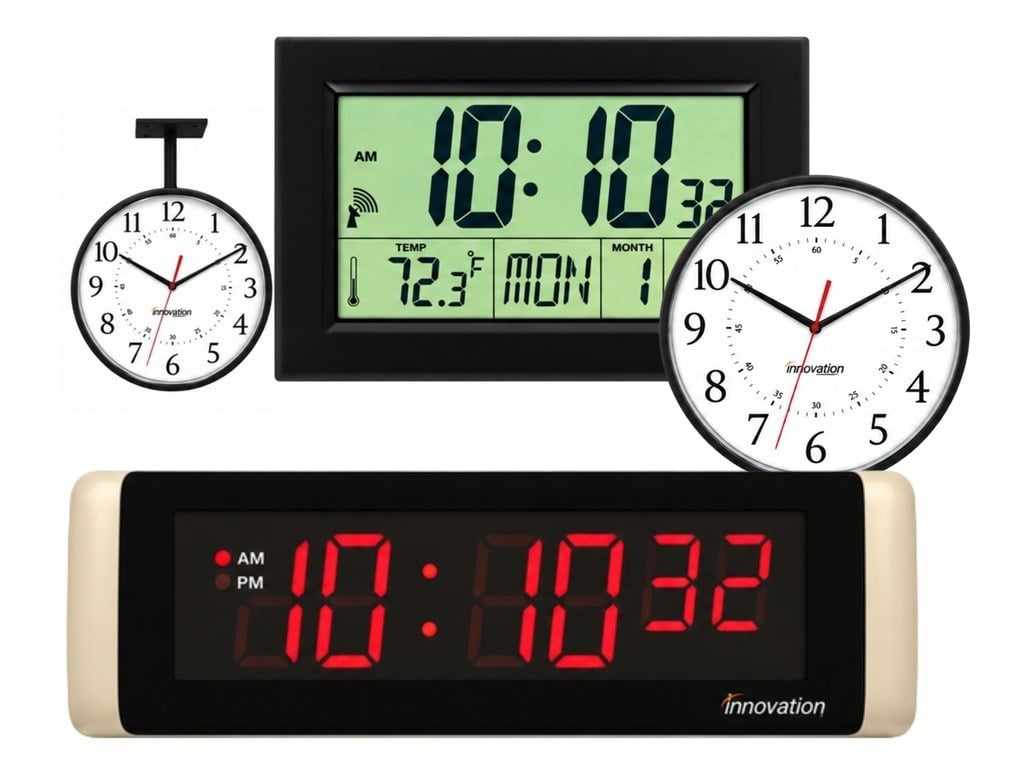
A WiFi clock from Innovation Wireless gives you synchronized, accurate, reliable time displays on the existing Wi-Fi network your facility already runs, with Wi-Fi clocks that connect to a standard 2.4GHz network: the Wi-Fi network provides the daily time update and the clocks automatically adjust for daylight saving time. There is no need for a physical master clock and no additional equipment. Install 4 D cell batteries in the analog WiFi wall clock and it connects to the WiFi network; the Wi-Fi LED digital clocks run on standard AC power and take the same daily time update from the same NTP server. As of November 2026, our published Wi-Fi analog clock specification lists IEEE 802.11 b/g/n Wi-Fi, WEP, WPA-PSK and WPA2-PSK security, FCC, IC and ETSI certification, and a three-year battery life expectancy on four D cells; our customer wall lists 72 organizations, from Yale and MIT to Cedars-Sinai, Amazon, and Costco. Free tech support, no maintenance, no subscriptions. Below: how the clocks take their time, the analog and LED digital lines with part numbers, where each one goes, and the questions facilities ask before they order.
In Short
- Runs on a standard 2.4GHz Wi-Fi network you already have: the Wi-Fi clocks pull time from an NTP server over your existing internet infrastructure, so there is no additional equipment.
- Analog WiFi wall clock: 4 D cell batteries, no cable for time correction and no electric connection to power the clock; single-sided for rooms, double-sided for hallways; 13-inch and 16-inch, three dial options, brushed aluminum available.
- Wi-Fi LED digital clock: red or white, 2.5-inch or 4-inch digits, standard AC power, a display viewable up to 200 feet, managed through the Sync Software.
- Maintenance free: the clocks adjust for daylight saving time automatically in spring and fall; on the analog clocks the only item that has to be maintained is changing the batteries, and that does not occur until after years of use. Clock configuration is performed before shipment as a free service, with no subscriptions.
How a WiFi Wall Clock Takes Its Time From Your Existing Wi-Fi Network
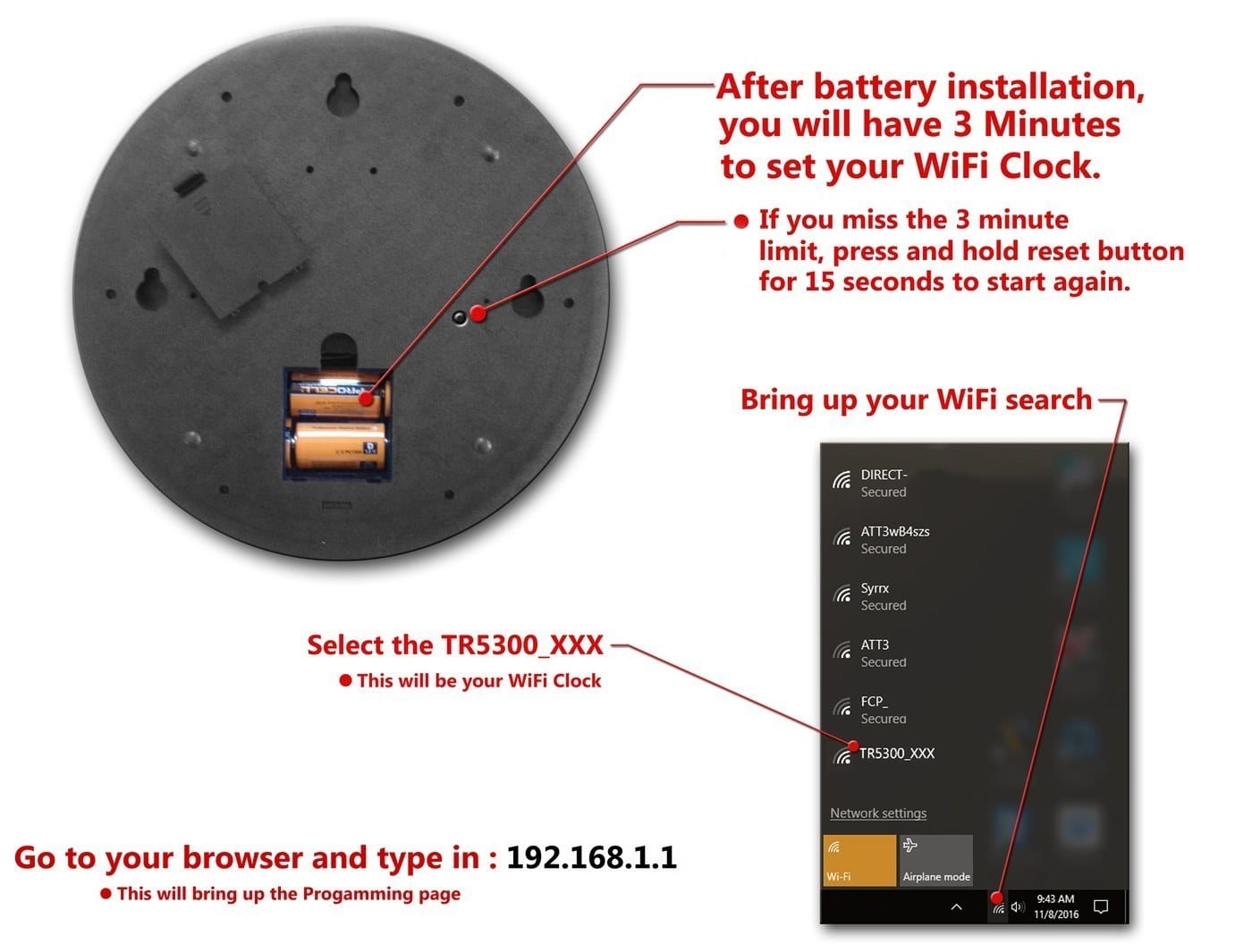
Our Wi-Fi clocks operate on a standard 2.4GHz Wi-Fi network. There is no need for a physical master clock: the Wi-Fi clocks piggyback on your building’s existing internet infrastructure to pull time from an NTP server, the Wi-Fi network provides the daily time update, and the clocks automatically adjust for daylight saving time. The advantage over a wired or radio-controlled system is that the time source is already in the building. Configuring WiFi clocks to your network is as simple as connecting a PC to your Wi-Fi; an SSID and password are required for programming, and as a free service the clock configuration is performed prior to shipment, so the clocks arrive knowing your network. The analog WiFi wall clock has a single battery compartment on the enclosed back panel: remove the cover, insert 4 D cell batteries, and the clock automatically begins its start-up procedure; once the clock is synced to your network it is ready to be placed on the wall. Just follow the quick start guide to a flawless start-up: after battery installation you have three minutes to set the clock, and the guide also covers resetting or changing the time with the Device Finder on the PC, the reset button, and the programming page at the 192.168.1.1 address. The Wi-Fi LED digital clocks take the same daily time update on standard AC power. The one thing to check before the Wi-Fi clocks arrive is coverage: make sure the router reaches the areas where signals historically drop, such as stairwells and basements, so every clock can connect.
What the Clocks You Have Now Are Costing You
In a building without a synchronized system, somebody still walks the halls twice a year. The plug-in digital clock in the conference room reads one time, the battery-powered analog clock in the break room reads another, the radio-controlled atomic clock by the loading dock lost its signal behind the steel, and the one at the end of the hallway stopped at 4:10 in August. When the time change comes in spring and fall, each of those clocks waits for a person on a ladder, and until that person gets there the facility runs on three different versions of the same hour. A low-voltage wired system fixes the drift but brings its own maintenance problems, and it needs a cable to every clock, an electrician to run it, and a head-end to feed it; the price of the clocks is the small part of that bill. That is how the choice usually looks: live with clocks that disagree, or wire the building.
Why Clocks Drift Apart, and What a WiFi Clock Replaces
The clocks are not the problem; the missing time source is. The difference between a clock that drifts and a clock that does not is whether anything sets it after the day it went up. A clock that nothing corrects can only drift from the day it was set, and every battery swap, power cut, and clock change moves it further from the clock next door. Wi-Fi clocks put one source of truth behind every clock on the network: each clock takes its daily time update from the NTP server over the Wi-Fi network, so every room and every hallway shows the same time, and the time change in spring and fall is made automatically without any manual intervention. When the facility opens for business on Monday after the switch from standard time to daylight time, and vice versa in the fall, the facility is ready and operating at the correct time. Because the analog clocks run on batteries and the time arrives over Wi-Fi, there is no cable to run for time correction and no electric connection to power the clock: no conduit, no electrician, nothing new on the wall but the clocks. The result is synchronized analog clocks and digital clocks on the Wi-Fi you already own, and it is maintenance free: on the analog clocks the only item that has to be maintained is changing the batteries, and that does not occur until after years of use.
WiFi Analog Clocks: Sizes, Dials, and Where Each One Goes
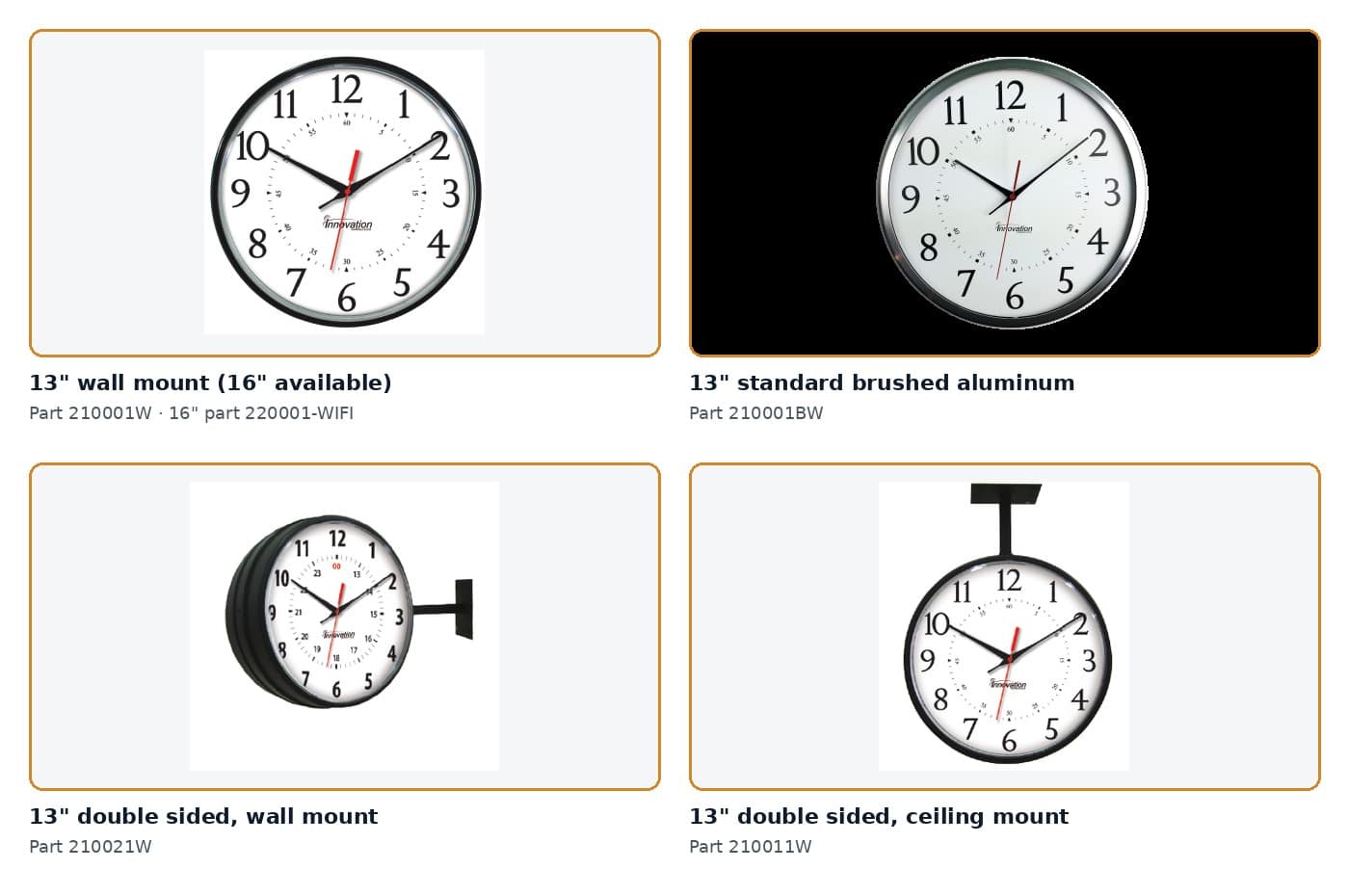
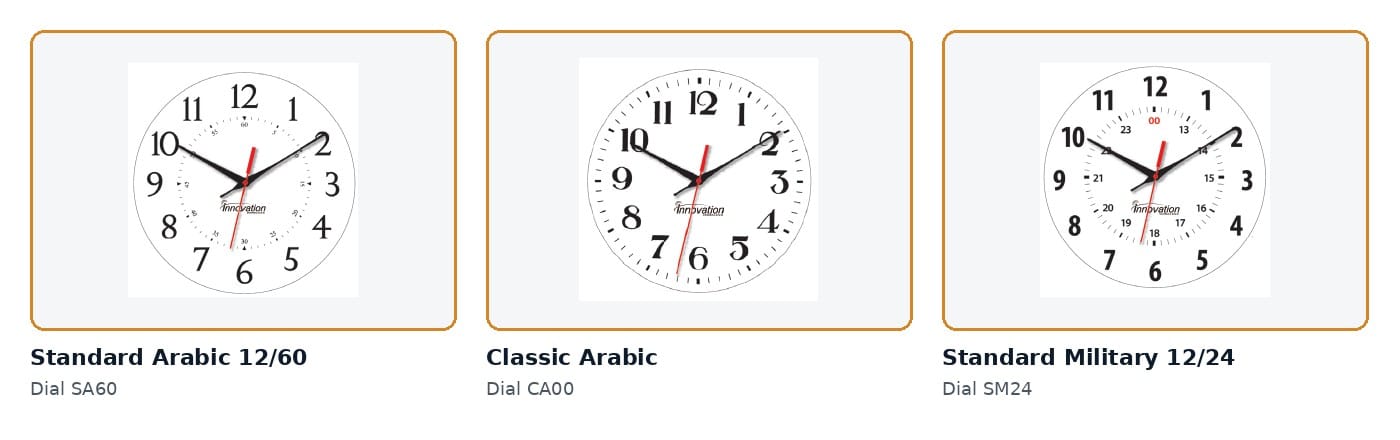
We offer both single-sided and double-sided Wi-Fi clocks, and both are analog clocks with a dial and hands. The single-sided clocks are perfect for any type of room that needs synchronized, accurate time: classrooms, offices, nurse stations, break rooms, labs. The double-sided clocks are ideal for hallways; they are typically placed in the middle of a long hallway and can be seen from a fair distance away in the hall, on a wall-mount arm or a ceiling mount. The 13-inch clock has a 12.75-inch front case, a 12-inch dial, an edge thickness of 2.6 inches and a center thickness of 3 inches; a 16-inch size (part 220001-WIFI) is also available. Three dial options cover the standard Arabic 12/60 dial, the classic Arabic dial, and the standard military 12/24 dial, and a brushed aluminum sleeve over the ABS casing is available for the brushed aluminum style. Every analog WiFi clock is heavy-duty construction with a durable ABS casing and a shatter-resistant polycarbonate lens, Wi-Fi IEEE 802.11 b/g/n with WEP, WPA-PSK and WPA2-PSK security, real-time clock status, and FCC (US), IC (Canada) and ETSI (Europe) certification. Power is four D cell batteries with a battery life expectancy of three years.
Wi-Fi LED Digital Clocks on the Same Network
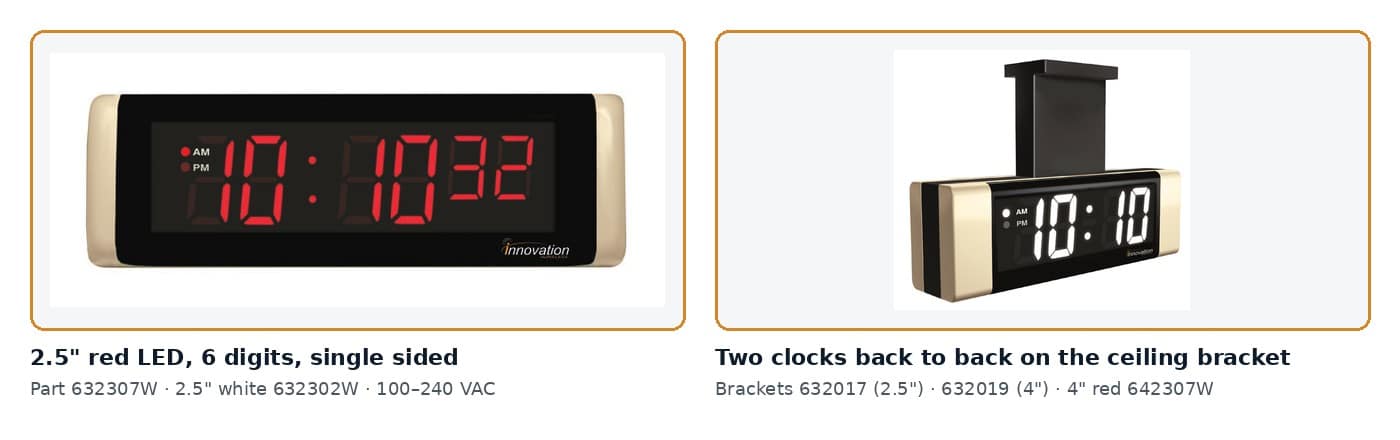
Wi-Fi LED digital clocks are available in red and white with 2.5-inch or 4-inch digits, and they are viewable up to 200 feet away. The digital clocks are powered by standard AC power and receive their daily time updates via your Wi-Fi network, so they always display accurate time alongside the analog clocks. The display is a highly visible LED display with adjustable brightness (dimming), a 12/24-hour display format, and alternating time and date, and the clocks are managed through the Sync Software (part 7962-SOF), which gives you one place to manage the digital clocks on the network; the analog clocks report real-time clock status. Listed part numbers: 2.5-inch red 6-digit 632307W, 2.5-inch white 632302W, and 4-inch red 4-digit 642307W; other display types and color options are currently available as quoted per project. For hallways and large open areas, a dual-sided wall or ceiling bracket mounts two single-sided clocks back to back. Operating temperature range is 32 to 122 °F.
Where the WiFi Clock Goes: Schools, Hospitals, Offices, Plants, and Campuses
If the building already has Wi-Fi where the clocks need to go, this is the clock. In a school, Wi-Fi clocks ride the wireless network the school already has, so every classroom and hallway shows the same time, and the double-sided hallway clocks, placed in the middle of a long hallway, can be seen from a fair distance away in the hall; our school clocks page covers the full line for K-12. In a hospital or clinic, the single-sided clocks go in patient rooms, nurse stations and treatment rooms, where charting needs the same time on every wall. In offices, plants and warehouses, the analog clocks go up where the Wi-Fi reaches, with no cable for time correction and no electric connection to power the clock, and the Wi-Fi LED digital clocks run on standard AC power and take their daily time update over the same Wi-Fi; the advantage over the clocks on the wall today is that these set themselves. On a campus with several buildings, each building’s Wi-Fi carries its own clocks and all of them take the same time. Where a building has no Wi-Fi coverage in a wing, or you want clocks on a cable-fed network instead, we match the technology to what you already own: our 467 MHz wireless clock system needs no network at the clock, because the clocks receive the broadcast off the 467 frequency band, and our PoE clocks draw power and time through the network cabling. All three sync to one time source and adjust for daylight saving time automatically.
There is no need for a physical Master Clock. The Wi-Fi network will provide the daily time update and automatically adjust for daylight saving time.
Why Buy Your WiFi Clock From Innovation Wireless
We are the manufacturer, based in Culver City, California: synchronized clock systems and communication systems since 2008, and our customer wall lists 72 organizations, from Yale, MIT, and the University of Texas to Cedars-Sinai, Amazon, Costco, West Point Academy, the Tennessee Valley Authority, and the USPS. Every WiFi clock comes with free tech support, no maintenance, and no subscriptions: the clocks take NTP time over the Wi-Fi network you already run. The Wi-Fi standard, security modes, battery life expectancy and dimensions are on the Analog WiFi Clock Spec Sheet and the WiFi Digital LED Spec Sheet linked on this page, with the FCC, IC and ETSI certification on the analog sheet, ready for a submittal. As Bob Turgeon of Simplex Grinnell wrote in the testimonial on this page: “They are extremely easy to communicate with this and it makes it easier to work with my customers. I look forward to many more years of great service.”
